YouTube Thumbnail Size: Videos and Shorts, and How Text Holds Up When It Shrinks
By Brooke · Specs checked against YouTube Help on November 16 and 17, 2026 · If YouTube Help changes, this page may be out of date.
If you only need the numbers, here they are. YouTube Help currently recommends uploading a 3840 × 2160 pixel thumbnail for videos (16:9) and 2160 × 3840 for Shorts (9:16). The rest of this page covers the details that are easy to get wrong, and a check you can do yourself to see whether the text on your thumbnail still reads when the image is shown small.
Several size guides read in November 2026, some of them updated in 2026, still list 1280 × 720.
This page does not predict click-through rate, and nothing here is a guarantee of how a video will perform.
Quick answer: upload recommendations from YouTube Help
Source for every number in this table: Add custom thumbnails on YouTube (YouTube Help), checked on November 16 and 17, 2026.
Upload recommendations (YouTube Help)
| Item | Regular videos | Shorts |
|---|---|---|
| Recommended resolution | 3840 × 2160 pixels | 2160 × 3840 pixels |
| Minimum size | Width of at least 640 pixels | Height of at least 640 pixels |
| Recommended aspect ratio | 16:9 | 9:16 |
| Format | Image formats such as JPG or PNG | Image formats such as JPG or PNG |
| File size limit | Mobile upload: 2 MB. Desktop upload: 50 MB | Desktop upload: 50 MB |
| Where to set it | YouTube Studio (your account must be verified to upload your own) | YouTube Studio on a computer only (your account must be verified) |
Notes on the table, each taken from the same YouTube Help page:
- YouTube Help says your custom thumbnail "should be as large as possible."
- The format line says "such as JPG or PNG." It is an example, not a complete list, so this page does not claim that other formats are or are not accepted.
- The file size limit depends on the device you upload from. The page lists 2 MB for video thumbnails on mobile and 50 MB for video, Shorts and podcast thumbnails on desktop. The page does not list a mobile limit for Shorts.
- YouTube Help also lists 10 MB for podcast thumbnails on mobile and 1:1 for podcast playlists; this page does not cover podcasts further.
- Thumbnails must follow YouTube's Community Guidelines, and there is a daily limit on how many custom thumbnails a channel can upload. YouTube Help says limits "may vary by country/region or channel history."
Regular videos
Aspect ratio and size
Aim for a 16:9 image. The recommended resolution is 3840 × 2160, and the minimum is a width of 640 pixels. A larger file does not change the shape: 3840 × 2160 and 1280 × 720 are both 16:9. What changes is how much detail the image holds.
File size and format
The 2 MB limit applies when you upload from a mobile device, and the 50 MB limit applies when you upload from a desktop, per YouTube Help. A 3840 × 2160 PNG with fine detail can be large, so if you work on a phone, check the file size before you upload. If you are on a computer, the 50 MB limit leaves much more room.
Shorts thumbnails
Can you set a custom thumbnail for a Short?
According to YouTube Help, yes, with two conditions: custom thumbnails for Shorts are currently only available to add in YouTube Studio on a computer, and your account must be verified.
The steps on the YouTube Help page, in short: sign in to YouTube Studio, choose Content from the left menu, select Shorts at the top, open the Short you want to edit, then under "Thumbnail" click Upload file and Save. For uploaded files, YouTube Help gives 9:16 as the recommended aspect ratio, and 2160 × 3840 as the recommended resolution, with a minimum height of 640 pixels. Check the YouTube Help page for the current steps, since the interface can change.
What counts as a Short
The definition of a Short appears as a note on YouTube Help's page "A/B test titles & thumbnails" (it is not a Shorts specification page). The note says: "Video uploads up to three minutes in length that are square or taller in aspect ratio will be considered a Short." Source: A/B test titles & thumbnails (YouTube Help), checked on November 17, 2026.
Vertical videos with a 16:9 custom thumbnail
This point is often stated loosely. The exact wording on the YouTube Help page is:
"Vertical videos with 16:9 custom thumbnails will be replaced by an auto-generated 4:5 thumbnail on the home, explore, and subscription pages. Your custom thumbnail will still appear on the watch feed, watch history, and non-mobile platforms."
Reading it carefully:
- It is about vertical videos that have a 16:9 custom thumbnail. The note does not name Shorts, so this page does not call it a "Shorts rule."
- The replacement happens on the home, explore, and subscription pages (the page's wording), and the replacement is an auto-generated 4:5 thumbnail.
- The 16:9 custom thumbnail still appears on the watch feed, watch history, and non-mobile platforms.
- YouTube Help does not say in that note how the auto-generated thumbnail is chosen. This page does not guess.
If your vertical video has a 16:9 custom thumbnail, you may want to think about which places will show the image you made and which will show the auto-generated one.
Upload size is not the size you see in a feed
These are three different things.
- Upload recommendation. What YouTube Help recommends you upload: 3840 × 2160 for videos, 2160 × 3840 for Shorts (the table above). YouTube Help says your custom thumbnail "should be as large as possible." It also notes that thumbnails show up differently across devices (Thumbnail & title tips, YouTube Help, checked on November 16 and 17, 2026).
- The size shown in a feed. The displayed size varies by device, app, screen and where the thumbnail appears. YouTube Help does not publish a single display size, and this page does not either. One phone was measured (see "Real phone feeds" below), and the comparison images use simulated widths that were chosen for the comparison and are labeled as such.
- The versions you can download. If you download an existing thumbnail from a public video, you get the image files YouTube serves for that video. In the check below, the largest one was 1280 × 720, smaller than the upload recommendation, so a downloaded file is not the upload recommendation, and it is not necessarily the file the creator uploaded.
What the downloader can get (a check of three videos, not an upload spec)
On November 17, 2026, the pixels of all five downloadable versions were checked in three public videos. In all three videos, the results were the same:
| Version (downloader name) | Size | Aspect ratio | Black bars in the image file |
|---|---|---|---|
| Max Resolution | 1280 × 720 | 16:9 | None |
| Standard | 640 × 480 | 4:3 | Yes: 60 px at the top and 60 px at the bottom |
| High | 480 × 360 | 4:3 | Yes: about 43 to 45 px at the top and bottom |
| Medium | 320 × 180 | 16:9 | None |
| Default | 120 × 90 | 4:3 | Yes: about 8 to 11 px at the top and bottom |
In these three videos, the black bars are part of the image file that YouTube returns for the three 4:3 versions. They are not added by the Will It Click? downloader: it shows the image whole and saves the original file, bars included. If you want a clean 16:9 image from a download, the two 16:9 versions in this check had none. Only three videos were checked, so this page does not say the same holds for every video. The largest version was 1280 × 720, which says nothing about what YouTube accepts: the official recommendation for uploading is still 3840 × 2160.
If you want to see which versions exist for a specific public video, you can download the thumbnail to see its available sizes. Those versions are for reference and are not recommended upload sizes, and the black bars have nothing to do with the upload recommendation above.
Will the text still read when the thumbnail is small?
YouTube Help gives general advice on this: "If you add text, make sure to use a font that's easy to read," and "Thumbnails show up differently across devices, so make sure your thumbnail image is as large as possible." (Source: Thumbnail & title tips, checked on November 16 and 17, 2026.) It does not give a minimum text size, and this page does not either.
What can be shown is what happens to the same image when it is scaled down. Three mock-up thumbnails were made for this article and each was scaled to six widths: 1280, 640, 360, 246, 168 and 120 pixels.
Important: these are simulated widths. They are widths chosen for this comparison, not measured YouTube sizes. The three images are mock-ups made for this article. They are an illustration, not an experiment or a study, and nothing here is a general rule about what people can or cannot read.
What the strips show, and what they do not. The strips show how large the text is relative to the width of the image. They do not show how sharp the text would look on a phone. A phone draws a thumbnail with more pixels than these images have, so it looks sharper, but the physical size of the text on screen depends on the width at which the thumbnail is displayed (in dp). The section "Real phone feeds" below uses that width, not the strip widths, for its numbers.
How the mock-ups were made
- Each mock-up is a 1280 × 720 image: a blue gradient background, a play-button shape, and one block of white or pale text in Inter ExtraBold.
- Each one was scaled to the simulated widths with the Lanczos resampling filter (Python / Pillow). Each version is shown at its own pixel size, so 1 image pixel = 1 CSS pixel. On screens with a higher pixel density, the browser enlarges the image, so it looks softer than a thumbnail on a real phone.
- The numbers below are calculations on these mock-ups, not measurements of any real device or video.
Mock-up 1: large text
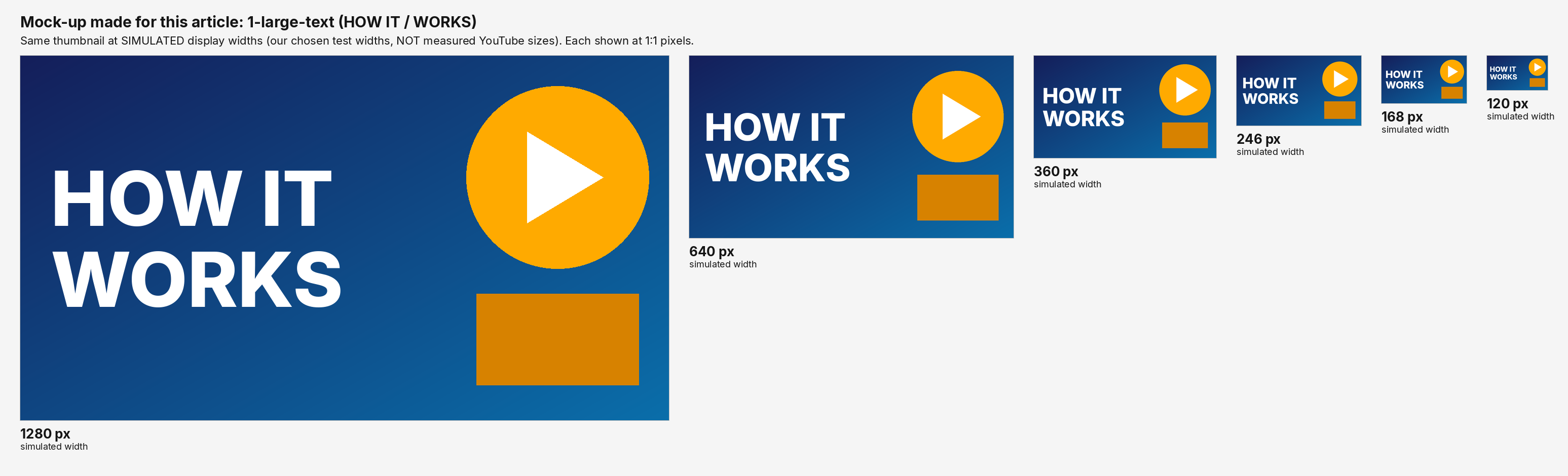
In the strip, the two large words are still easy to make out at every width, including the smallest.
Mock-up 2: small text
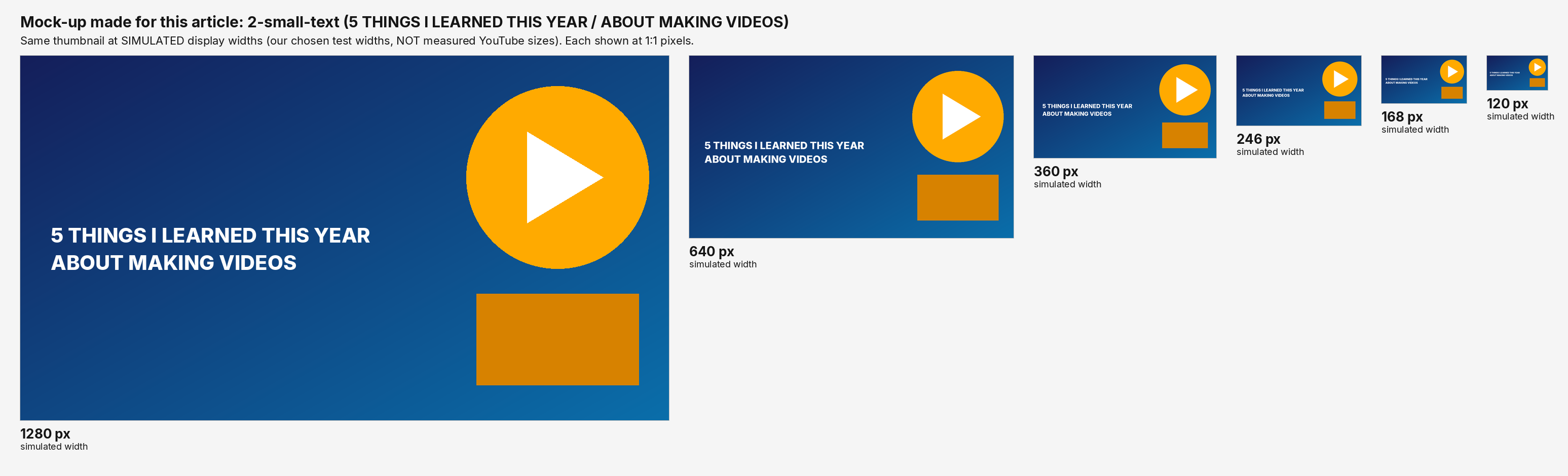
In the strip, the two lines are readable at the largest widths and turn into thin marks at the smaller ones, with the smallest widths looking like texture rather than words.
Mock-up 3: low-contrast text
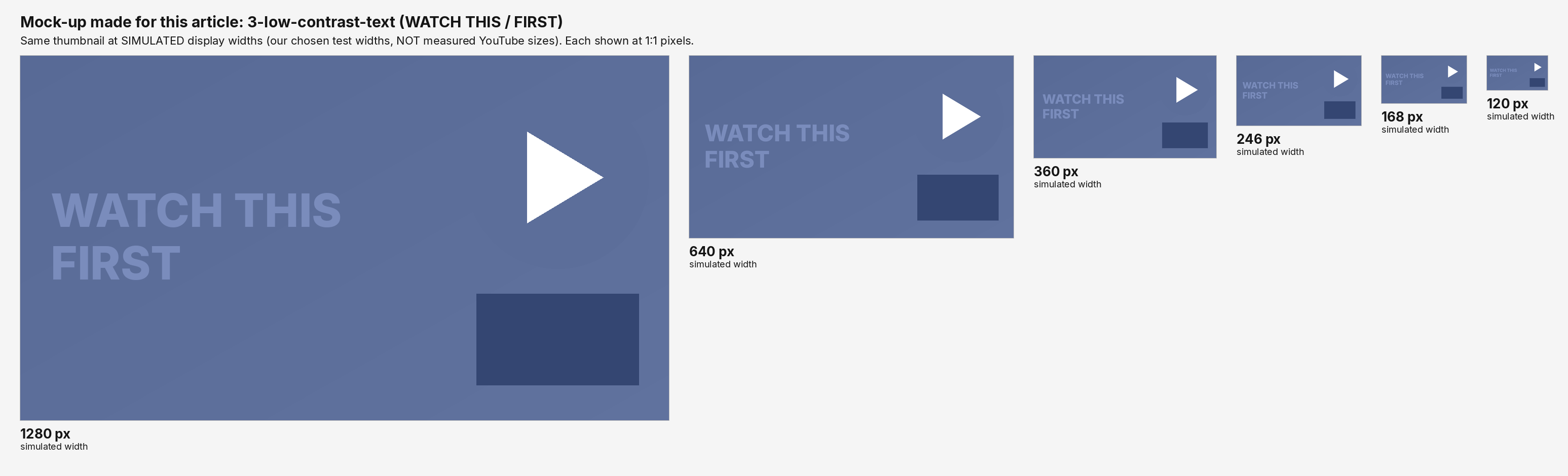
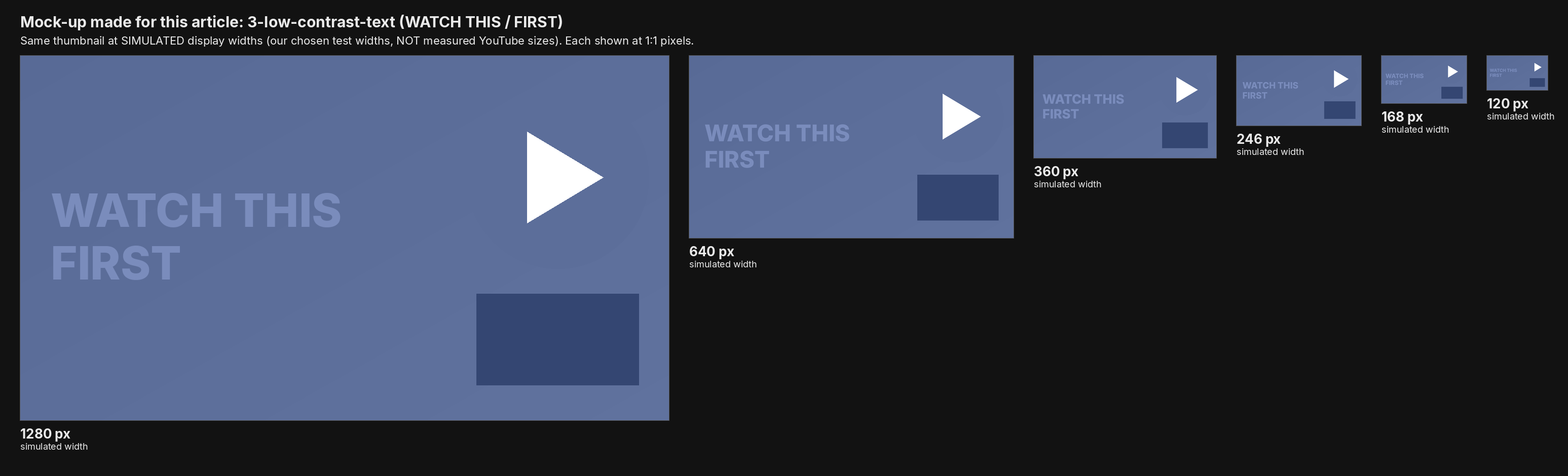
In the strip, this text is already low in visual weight at 1280 pixels, and it fades further as the image shrinks. Its capital letters are more than twice as tall as those of mock-up 2 (66 px against 29 px), yet it is harder to read, so the problem here is the colors, not the size.
The numbers calculated on the mock-ups
Two things were calculated on the mock-ups. Both are plain arithmetic, listed so you can repeat it with your own images.
- Equivalent cap height = the height of a capital "H" in the 1280-pixel image × (simulated width ÷ 1280). It is the height the capital letters would have in pixels if the image were scaled to that width.
- Contrast ratio = the WCAG formula (L1 + 0.05) ÷ (L2 + 0.05), using sRGB relative luminance. For each mock-up, the background pixels inside the text's bounding box (without the text) were taken, the ratio against the text color was computed for every pixel, and the lowest and highest values are reported.
| Mock-up | Text color | Type size at 1280 | Cap height at 1280 | Contrast (lowest / highest) |
|---|---|---|---|---|
| 1 Large text | white | 150 px | 109 px | 8.60 / 13.24 |
| 2 Small text | white | 40 px | 29 px | 8.84 / 12.16 |
| 3 Low contrast | #7A8CBC on blue-gray | 90 px | 66 px | 1.52 / 1.56 |
Equivalent cap height in pixels at each simulated width (widths chosen for this comparison, not measured YouTube sizes):
| Mock-up | 1280 | 640 | 360 | 246 | 168 | 120 |
|---|---|---|---|---|---|---|
| 1 Large text | 109.0 | 54.5 | 30.7 | 21.0 | 14.3 | 10.2 |
| 2 Small text | 29.0 | 14.5 | 8.2 | 5.6 | 3.8 | 2.7 |
| 3 Low contrast | 66.0 | 33.0 | 18.6 | 12.7 | 8.7 | 6.2 |
What these numbers do and do not say:
- They tell you how tall the letters become when the image is scaled down, and how strongly the text color differs from its background in these three mock-ups.
- They do not define a threshold. There is no data here that says "below N pixels of cap height, text cannot be read," or "below a contrast ratio of X, text cannot be read," and this page does not claim one. For a threshold you would need to test real viewers on real devices. What the numbers give you is a way to compare your own image with these examples.
A way to check your own thumbnail
You do not need a tool for this. It takes a few minutes.
- Export your thumbnail at its full size.
- Scale a copy down to a width in the range of the simulated widths above (for example 360, 246 or 168 px). Any image editor can do this; use a standard resampling filter and do not sharpen afterwards.
- View it at its own pixel size (1 image pixel = 1 CSS pixel), without zooming in. On a computer, open it in a window that does not enlarge it. On a high-density screen the browser enlarges the image, so it looks softer than a thumbnail on a real phone. For a phone-like impression, send the small file to your phone and look at it at arm's length. This does not replicate the real feed, but it tells you whether the text survives shrinking.
- Estimate the letter height. Measure the height of a capital letter in the full-size file in pixels, and multiply by (width you scaled to ÷ your image width). Compare the result with the table above. That tells you whether your lettering is closer to mock-up 1 or mock-up 2. If you know the width in dp at which a thumbnail is shown, you can do the same arithmetic with that width (see the next sections).
- Squint test for contrast. Look at the scaled image and check whether the text separates from the background without effort. If it only works at full size, compare the text color and background with a contrast checker; the mock-up 3 numbers show how low a ratio can be.
- Ask a second person. One honest "what does it say?" from someone who has not seen the thumbnail is more useful than any number here.
This is a way to look at your own image, not a standard. Different people, screens and lighting will give different answers.
Real phone feeds: what was measured on one phone
Everything above uses simulated widths. This section is the only place on this page with measurements from a real phone, and it is limited: one phone, one day, one app version, portrait orientation.
The phone. A Nothing Phone (2a) running Android 16, with YouTube app version 21.40.165. Screenshots were taken on November 17, 2026. The phone reports a smallest screen width of 412 dp (density-independent pixels).
How the numbers were obtained. Four screenshots were taken in the YouTube app, and the thumbnail widths were measured from them. The screenshots had been shrunk by a messaging app (to 575 × 1280 pixels) before they were measured, so the measurement itself gives only proportions of the screen width. One pixel of the 575-pixel-wide screenshot is about 0.17 percentage points, so the uncertainty is about ±0.17 percentage points, possibly a pixel or two more because the messaging app resampled the images. The measurement was a pixel scan across each thumbnail's row, compared with the width of the screenshot, and the aspect ratio of each thumbnail was checked from its measured width and height. The shrunk screenshots have the same width-to-height proportion as this phone's screen as listed on third-party spec sites (575 ÷ 1280 = 0.449; 1084 ÷ 2412 = 0.449 and 1080 ÷ 2412 = 0.448, for the two widths listed), which is consistent with full-screen captures scaled down evenly. The duration label sits over the bottom-right corner of the thumbnail in the Home feed.
There are three kinds of numbers in the table below, and they should not be mixed up:
- Measured: the share of screen width, and the shape.
- Reported by the phone: the smallest screen width of 412 dp.
- Calculated: measured share × the phone's reported screen width (412 dp). The device-pixel column is derived from the screen resolution listed on spec sites, not measured.
| Where it appears | Share of screen width (measured) | Shape (measured) | Width in dp (calculated: share × 412 dp) | Device pixels (derived from the listed resolution) |
|---|---|---|---|---|
| Home feed | 100% (edge to edge, no side margins) | 16:9 (one example measured 575 × 324, a ratio of 1.77) | about 412 dp wide (about 232 dp tall at 16:9) | about 1080–1084 |
| Recommended list under a video | 100% | 16:9 (one example measured 575 × 325, a ratio of 1.77) | about 412 dp | about 1080–1084 |
| Shorts shelf on the Home feed (two columns) | about 46.4% per tile | Vertical tiles (height not reported, because text overlays made it unreliable to measure) | about 191 dp (46.4% × 412) | about 500 per tile |
Device-pixel figures are derived from the screen resolution listed on third-party spec sites (about 1084 × 2412 on some, 1080 × 2412 on others, so "about 1080–1084 pixels wide" is used) and are not measurements. As a consistency check only: 412 dp at the 2.625 density of Android's 420 dpi bucket is about 1081 device pixels, which agrees with the listed resolution. The density itself was not measured. These are device pixels (the physical pixels of the screen), not dp or CSS pixels.
What the same text measures at the widths measured on the phone
The simulated widths above are image pixels, and the dp widths from the phone are a different kind of number, so this page does not line them up against each other. Instead it uses a quantity that does not depend on screen density: the on-screen height of text.
How it is calculated: if a thumbnail is displayed W dp wide, then text that is T px tall in the 1280-pixel-wide original is displayed about T × W ÷ 1280 dp tall. This is calculated from the displayed widths measured above (412 dp and about 191 dp). It is not a measurement of any screen.
Applied to the three mock-ups (calculated: height in the 1280 px original × displayed width in dp ÷ 1280):
| Mock-up | In the 1280 px original (type size / cap height) | Home feed, about 412 dp wide (type size / cap height) | Shorts shelf tile, about 191 dp wide (type size / cap height) |
|---|---|---|---|
| 1 Large text | 150 px / 109 px | about 48.3 dp / 35.1 dp | about 22.4 dp / 16.3 dp |
| 2 Small text | 40 px / 29 px | about 12.9 dp / 9.3 dp | about 6.0 dp / 4.3 dp |
| 3 Low contrast | 90 px / 66 px | about 29.0 dp / 21.2 dp | about 13.4 dp / 9.9 dp |
How to read it:
- The same 40 px text of mock-up 2 comes to about 9 to 13 dp tall in the Home feed on this phone, and about 4 to 6 dp tall in a Shorts shelf tile. Text that is fine at the first width can be much smaller at the second.
- The Shorts shelf figure is a what-if. The tiles are vertical and the mock-ups are 16:9, so it answers the question "if an image 1280 px wide were scaled to 191 dp wide". For a real Shorts thumbnail, use that image's own width.
- Only numbers are given here. There is no claim about which heights can be read, because no data on that was collected. Compare these numbers with your own thumbnail, using your own image's text height and the width at which you expect it to be shown.
- A wide thumbnail does not mean small text is fine. In the Home feed screenshots the thumbnail filled the screen width, and the 40 px text of mock-up 2 still came to a font size of only about 13 dp.
- The simulated 360, 246, 168 and 120 px widths are still widths chosen for the strips. They are not matched against 412 dp or 191 dp.
Limits of the phone measurement.
- This is one phone (a Nothing Phone (2a) on Android 16), one day, one app version (21.40.165), in portrait. Other phones have different screen widths, so the same layout can give different sizes.
- Not measured: iPhone, landscape orientation, tablets, search result pages, desktop.
- YouTube's interface changes with app versions and experiments, so another phone, another app version or another day may differ.
- YouTube does not publish thumbnail display sizes. These are observations, not an official specification, and they do not say that thumbnails are 412 dp wide on phones in general.
Where Will It Click? fits in (briefly)
Will It Click? is a small web app that analyzes a public YouTube video's thumbnail and title, and how the two work together. It reads the public thumbnail and title; scores are directional research signals, not predicted click-through rates. AI can misread an image, so the feedback is a second opinion, and it is not a readability test or a phone preview. If you want to see how a published video's thumbnail and title fit together, you can analyze a video's thumbnail and title. For the method, see how the analysis works. If you are deciding whether to change an existing thumbnail or title, the guide to changing a YouTube thumbnail or title covers that separately, and this page does not repeat it.
What this page can't tell you
- CTR. This page does not say what size or text style earns more clicks. If you want to look at click-through rate, YouTube Help's Thumbnail & title tips point to the metrics in YouTube Analytics. Your own channel data is the place to see how your videos perform.
- Feed sizes. The measurements above are from one phone, one day, one app version, in portrait. Not measured: iPhone, landscape, tablets, search results, desktop. YouTube does not publish display sizes. Treat them as one observation, not a rule.
- Future changes. YouTube Help has changed its recommendations before. An archived copy of the same page from May 2025 recommended 1280 × 720 and 2 MB for video thumbnails, and said a custom thumbnail could not be uploaded for a Short, only a frame chosen from it. If this page and YouTube Help disagree, YouTube Help is right.
How this page was made
- Who. I'm Brooke, an IT engineer, and I'm the person behind Will It Click? (more on the About page).
- AI. This page was drafted with AI assistance. The specifications were checked against YouTube Help on November 16 and 17, 2026, and the mock-ups were generated with a script.
- Where the specs come from. The upload specifications on this page come from YouTube's own help pages, listed below.
- Where the mock-ups come from. The three comparison images are mock-ups generated with a short script. The widths in them are simulated; the contrast and cap-height numbers are calculations on those mock-ups. No third-party thumbnails are used.
- Where the download numbers come from. The sizes and black-bar figures come from a pixel-level check of all five downloadable versions in three public videos on November 17, 2026. They describe what could be downloaded, not an upload spec.
- Where the phone-feed numbers come from. On November 17, 2026, four screenshots were taken in the YouTube app on a Nothing Phone (2a) running Android 16, in portrait, and the share of screen width taken by each thumbnail was measured from them. The dp widths are those proportions multiplied by the screen width the phone reports (412 dp); the on-screen text heights are calculated from those dp widths. None of these is a direct pixel measurement of the feed. The screenshots are not published because they contain a personal account and personalized recommendations.
- Why. This page is meant to help anyone about to upload a thumbnail check the current YouTube Help recommendation and look at their own image at small sizes before publishing.
Sources and last checked
| Source | What it was used for | Last checked |
|---|---|---|
| Add custom thumbnails on YouTube (YouTube Help) | All upload specifications in the table, the Shorts conditions and steps, the 4:5 note | November 16 and 17, 2026 |
| Thumbnail & title tips (YouTube Help) | "easy to read" font advice; "thumbnails show up differently across devices" | November 16 and 17, 2026 |
| A/B test titles & thumbnails (YouTube Help) | The definition of a Short (a note on this page, not a Shorts specification page) | November 17, 2026 |
| A pixel-level check of five downloadable versions in three public videos | Aspect ratios and black bars | November 17, 2026 |
| The mock-ups and calculations | Simulated widths, cap height, contrast, on-screen text height | Generated November 11, 2026; text heights calculated November 17, 2026 |
| A measurement of four phone-feed screenshots (one phone, portrait) | Share of screen width for Home, recommended list and Shorts shelf | November 17, 2026 |
Device-pixel figures are derived from the screen resolution listed on spec sites and are not measurements.